



Last Issue: 5 x Entry Level Cloud Security Interview Questions
Next Issue: Learn this Container Security Tool… 📦⚔️
This Issue: Hacking Project 101: Reverse Shells with Netcat
I recently had a Cyber Notes reader reach out to share that they had landed an entry level cloud role in a FinTech company and they used some of the projects here as inspiration for their interview prep!!!!
This is incredible 💥 So, a huge shout out to them! And thank you for reading.
As promised, the projects are now bigger and better, and I’m spending a lot more time explaining the fundamentals 🤝
Let’s begin.
Read This > Then do the project…
Cloud fundamentals? Check. DevOps Skills? Check. AWS Certs? Check.
Hacking demo? That’s where things get interesting.
I keep seeing the same pattern in the cloud security beginner space: there’s almost no real showcase of what attackers actually do.
That’s exactly where I want to take Cyber Notes in the months ahead. Understanding the processes threat actors follow, the steps they take, and how they think is absolutely something you should know if you want to secure the cloud. To be honest, it is also way more interesting than configuring yet another Cloud Service.
This is where you are going to learn the fundamentals.
What’s a shell? In simple terms, it is the user interface that allows you to “talk” to the computer’s operating system. When you open your terminal and type commands, that’s you interacting with the shell. I’m guessing you’ve used one of these:
Bash (Linux / macOS): The industry standard for decades. Most Linux servers run this.
Zsh (macOS / Linux): Similar to Bash but with more user friendly features (themes, better autocomplete). It is now the default on Macs.
PowerShell (Windows): A powerful shell designed for system administration, treating outputs as objects rather than just text (a distinction I actually just learnt while researching this project).
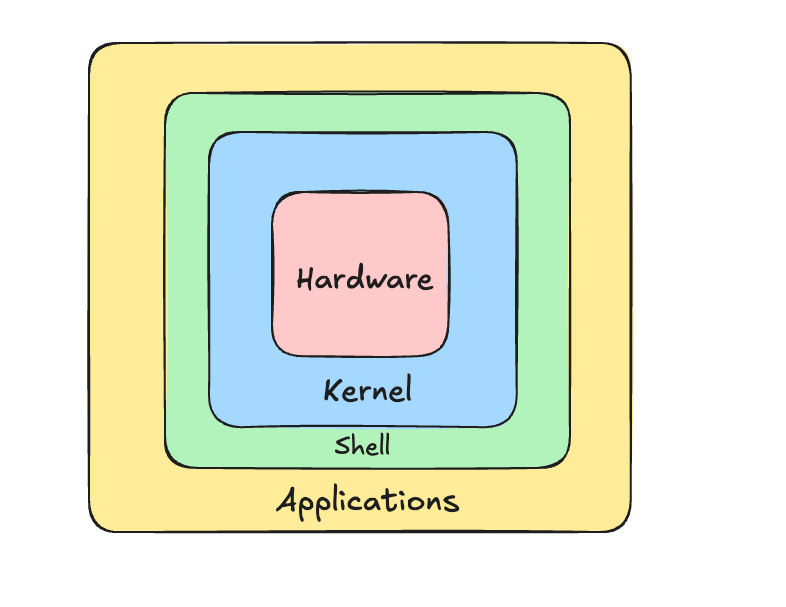
If you’re really interested in learning more here, I recommend taking a basic Computer Architecture course, specifically one that covers the Kernel, how the shell wraps around it, and how the user interacts with the hardware through the OS.
So, why does this matter for hacking? We know that opening a “Shell” on a user’s device acts as a gateway, letting us run commands to do whatever we want (so long as we have the authorisation)
If you’re an attacker, this sounds ideal, right? You are rarely going to get physical access to a target’s device, but what if you could open a shell over a network?
Congrats! That’s the basis of every attacker’s end goal.
What are the two ways they do this?
What’s a Bind Shell?
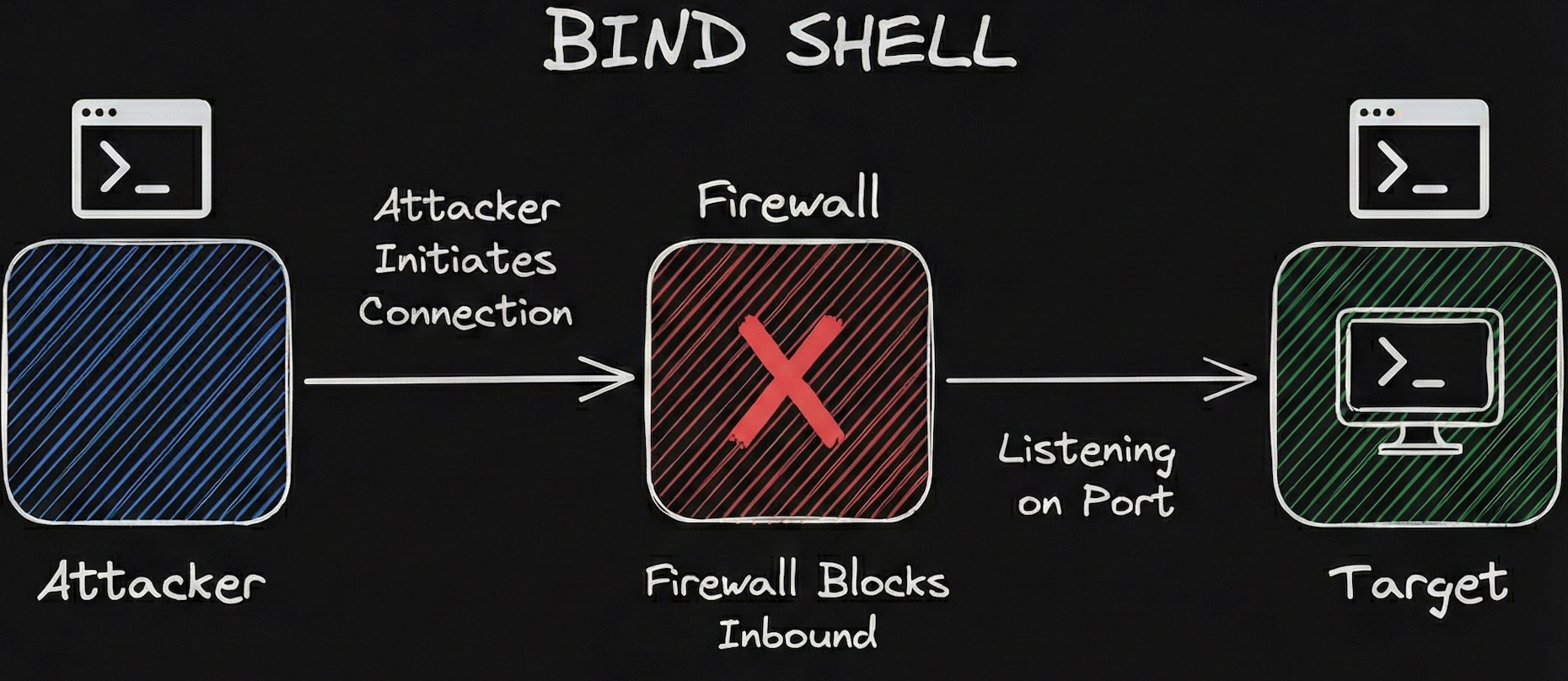
This is where the target machine is made or forced, however you want to word it to open a specific port and listen for an incoming connection from the attacker.
Basically, thinking like a hacker, we want to turn the target device into a server that we connect to.
We can do this with a number of tools (like Netcat), and we will take a proper look at them in the project.
But wait… what about Firewalls? Aren’t they supposed to block this kind of incoming connection?
Correct.
Most corporate environments and even home routers have strict Inbound firewall rules. They are designed to stop random people on the internet (you) from initiating a connection to their internal computers (the target).
If you try to connect to that open port from the outside, the firewall will see an unsolicited incoming request and simply drop it.
Which is why…..We should learn….
What’s a Reverse Shell?
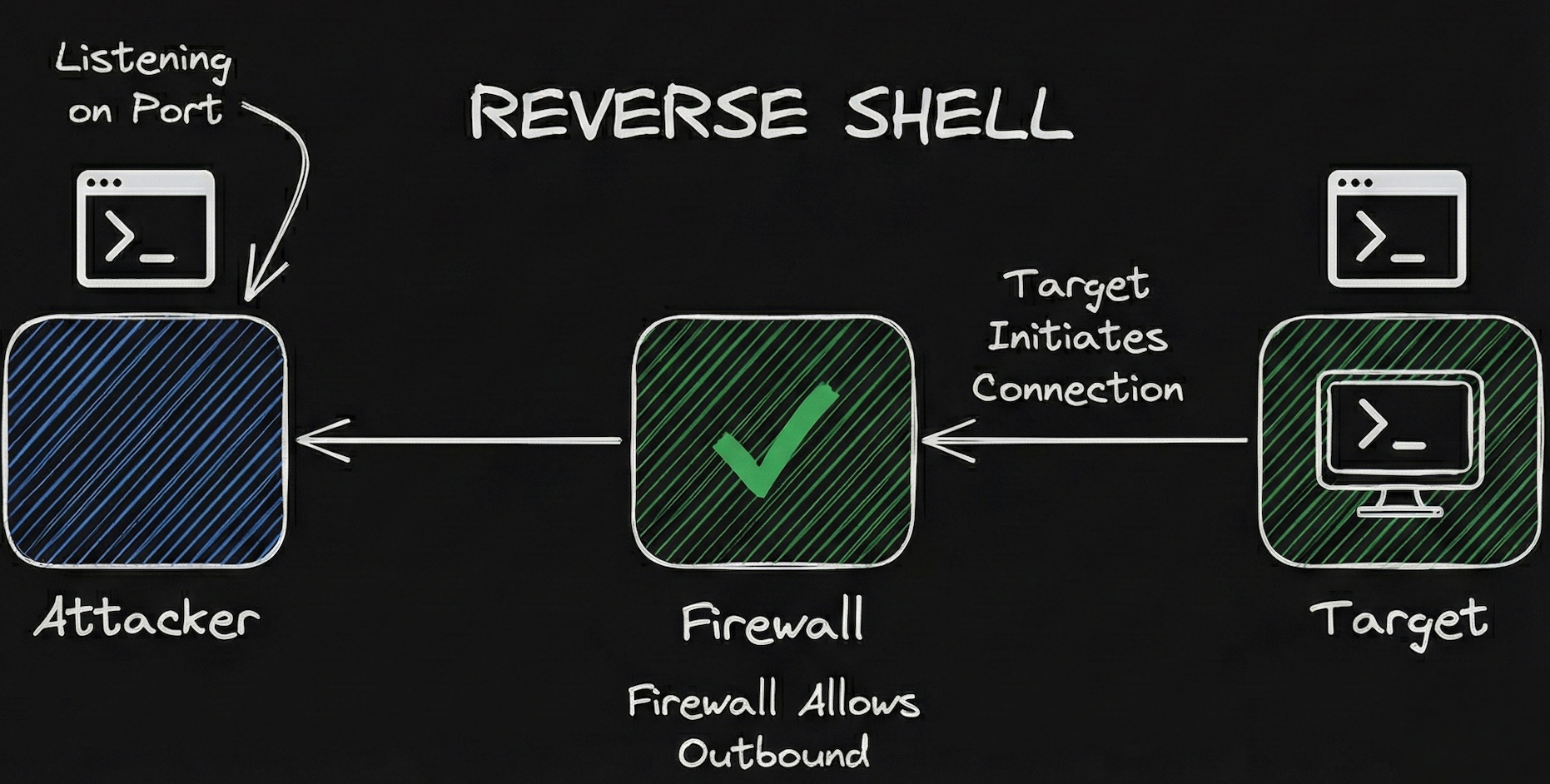
If the Bind Shell is us trying to push our way in, the Reverse Shell is us convincing the target to “phone home.”
Instead of the attacker trying to connect to the target (which the firewall blocks), we execute a payload on the target machine that tells it to connect back to us.
Why does this work?
Firewalls are strict on what traffic they let in (Inbound traffic), they are usually much more relaxed about what they let out (Outbound traffic). After all, the employees inside the network need to visit websites, send emails, and download updates. The firewall assumes that traffic leaving the building is generally safe.
So, in a Reverse Shell scenario:
The Attacker sets up a “Listener” on their own machine (waiting for a call).
The Target (victim) initiates the connection outbound to the attacker.
The Firewall sees an employee trying to connect to the internet and lets them through.
Sweet. We have a shell.
