The page is the AWS security tool comparison by Scott Piper. If that name rings a bell, it’s probably because Scott made flAWS.cloud and flAWS2.cloud, two free games that teach you common AWS mistakes by getting you to exploit them. If you haven’t played them, go do that.
Scott ran his own AWS security consultancy, Summit Route, and published a lot of free research while he was at it. This comparison is one of the most useful bits.
By the end of this newsletter, you’ll:
✅ Know the main kinds of AWS security tool and what each one is for
✅ Be able to read Scott’s comparison and use it to choose a tool
✅ Know how to check whether a tool is still alive before you invest time in it
✅ Have run Prowler against your own AWS account, broken something on purpose, and fixed it
Core Knowledge: what do these tools actually do?
What does an “AWS security tool” even mean?
Tons of the tools on Scott’s page are auditing tools. They read the settings in your AWS account and compare them against a list of known bad ideas. Is this S3 bucket public? Does this user have MFA? Is CloudTrail switched on? Each one of those questions is called a check.
Think of it like an MOT for your car. The tester doesn’t drive the car around looking for trouble. They go down a checklist: brakes, lights, tyres. Pass or fail, with a note on what to fix.
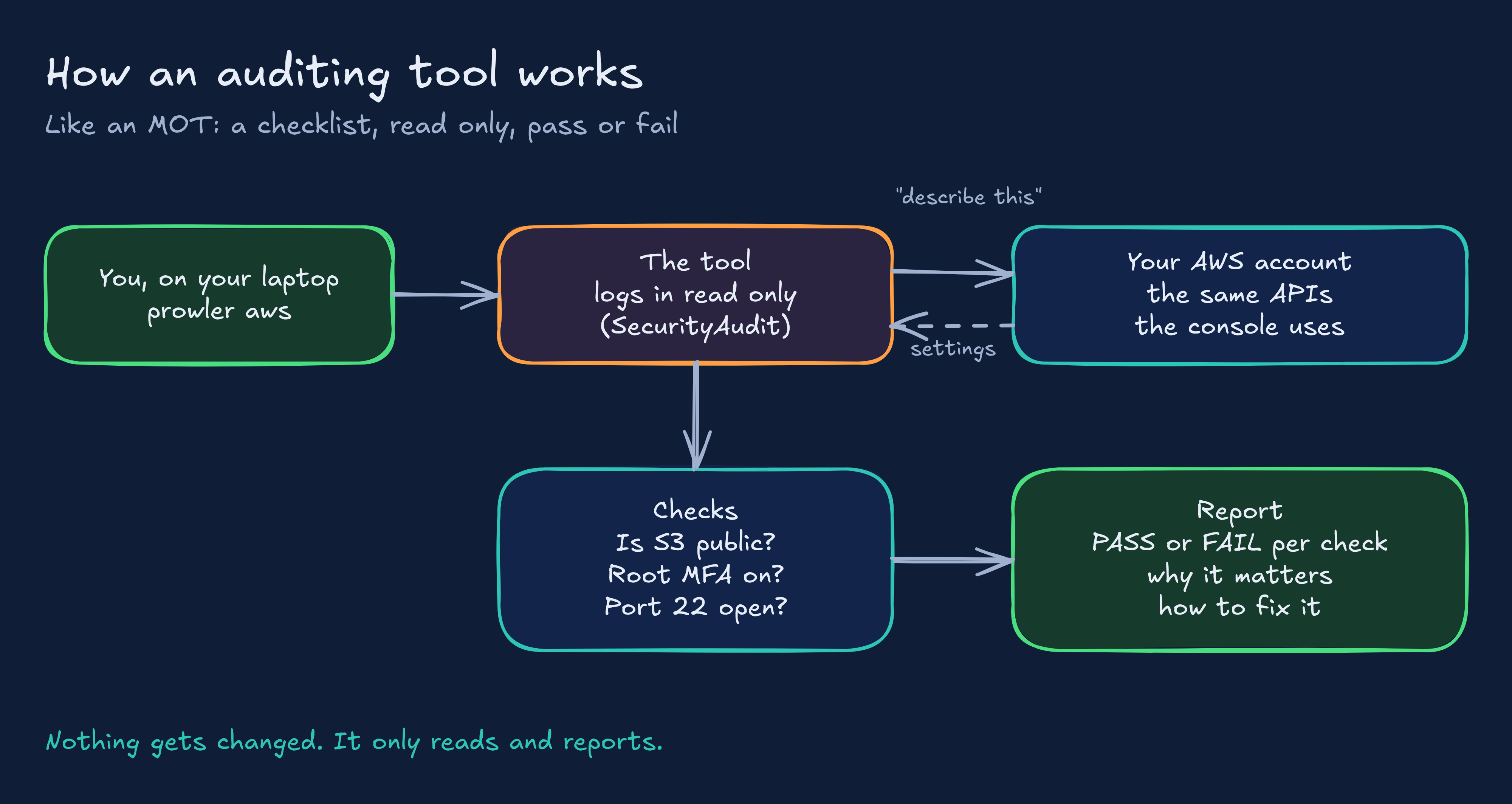
Here’s the bit beginners miss. The tool never “hacks” anything. It logs in with read only permissions and asks AWS polite questions through the same APIs the console uses. That’s why these tools are safe to run against your own account.
Scott compares six of them, and they fall into two camps:
Open source tools you run yourself:
Prowler: a command line tool full of checks, mapped to standards like the CIS AWS Benchmark.
CloudMapper: started life as a way to draw diagrams of your AWS network, then grew auditing features. Scott helped build it, and he says so on the page.
Security Monkey: Netflix’s tool for watching your account for risky changes.
PacBot: T-Mobile’s “policy as code” platform, built to watch lots of accounts continuously.
AWS’s own services:
Trusted Advisor: AWS’s built-in advice on cost, performance and security. Some checks are free, the full set needs a paid support plan.
AWS Config: records how your resources are set up over time and checks them against rules.
How to read Scott’s comparison
Open the page and you’ll see a big table. Each row is one check (”Is root MFA enabled?”, “Are any security groups open to the world?”). Each column is a tool. A tick means that tool does that check.
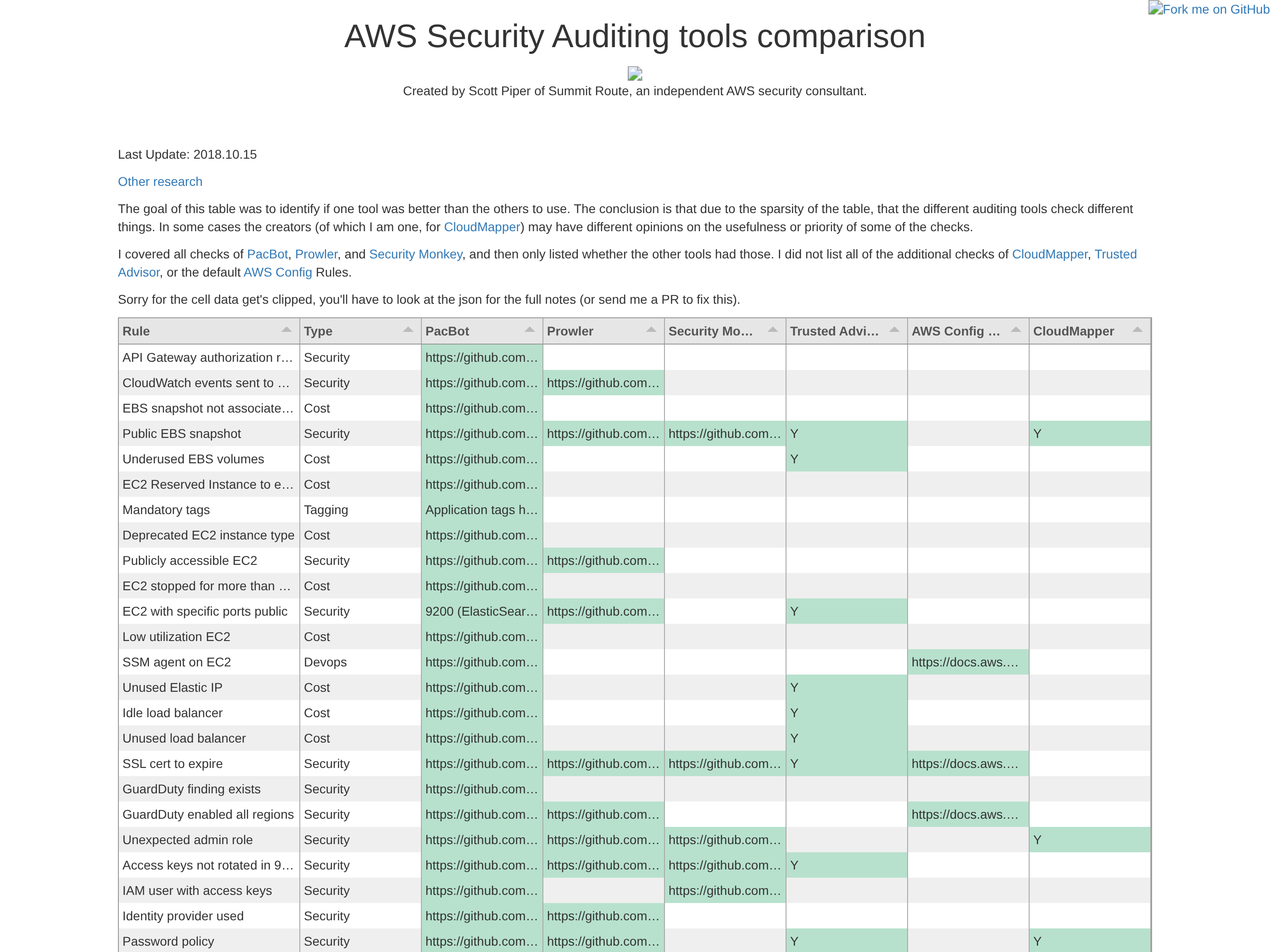
Now look at how empty it is. That’s the whole point of the page.
I pulled the numbers out of the data file behind the page. There are 97 checks. Half of them (49) were done by just one tool. Only three were done by all six: CloudTrail switched on, public RDS snapshots and public S3 buckets.
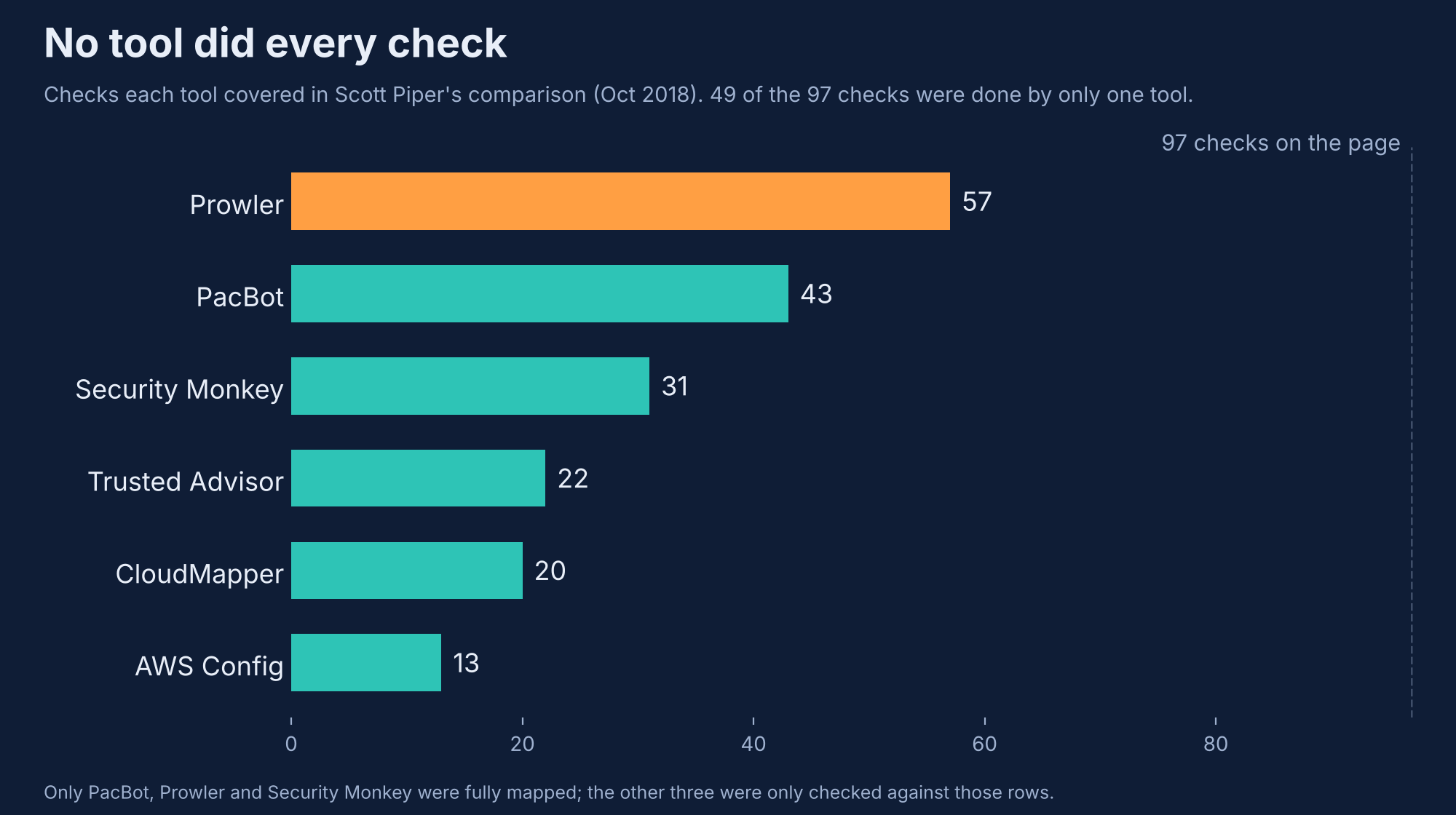
Scott went in trying to find out which tool was best. What he found is that they all check different things. There’s no tool that does everything, and the tools’ own creators wouldn’t agree on which checks matter most.
That’s a really useful lesson for a beginner. You’re not hunting for “the best tool”. You’re hunting for a good first tool that teaches you the most.
My pick for beginners: Prowler
My opinion: start with Prowler. Why?
It’s free and open source, and it runs from your laptop.
It’s very actively maintained.
Every finding tells you what’s wrong, why it matters and how to fix it. That’s basically a free AWS security course hiding in a command line tool.
It maps findings to standards like CIS, which is the language security teams and auditors speak.
It’s used in the real world, so it’s a fair thing to put on your CV.
ScoutSuite (from NCC Group) is another solid open source option that didn’t make Scott’s table, and AWS Security Hub is where AWS wants you to gather all your findings in one place. Both are worth a look once you’ve got Prowler down. That’s for another time though.
Project time! Break it, scan it, fix it
Here’s the plan. We’ll set up Prowler, scan your account, deliberately make a classic mistake, watch Prowler catch it, then fix it. That loop (break, scan, fix, rescan) is how you actually learn a tool.
Cost: Prowler is free, the API calls it makes are free, and the thing we break is free. I’d still set a billing alert, it’s a good habit.
Step One: Use a practice account
Don’t do this in your work account. Use a personal AWS account you’re happy to tinker with.
Turn on MFA for the root user.
Set up a zero spend budget in AWS Budgets so you get an email if anything starts costing money.
Step Two: Give Prowler a read only identity
In IAM, create a user called prowler-audit and attach two AWS managed policies: SecurityAudit and ViewOnlyAccess. That’s what the Prowler docs recommend. It lets the tool read your settings, but never change them. Least privilege in action.
Create an access key for that user, then add it to the AWS CLI as its own profile:
aws configure --profile prowler
aws sts get-caller-identity --profile prowler
The second command asks AWS “who am I?”. If it prints prowler-audit in the ARN, you’re sorted.
Side Note: Long lived access keys are a risk. For a practice account they’re fine, but delete the key when you’re done. At work you’d use IAM Identity Center (SSO) or a role instead.
Step Three: Install Prowler
You’ll need Python 3.10 to 3.13.
pip install prowler
prowler -v
If you’ve got pipx, pipx install prowler keeps it tidy in its own environment.
Step Four: Have a nosey before you scan
This is the bit most people skip. Look at what the tool actually checks:
prowler aws --list-services
prowler aws --list-checks --services ec2
Every check has a name, a description and a severity. Here I’ve filtered for the SSH checks we’re about to trigger:
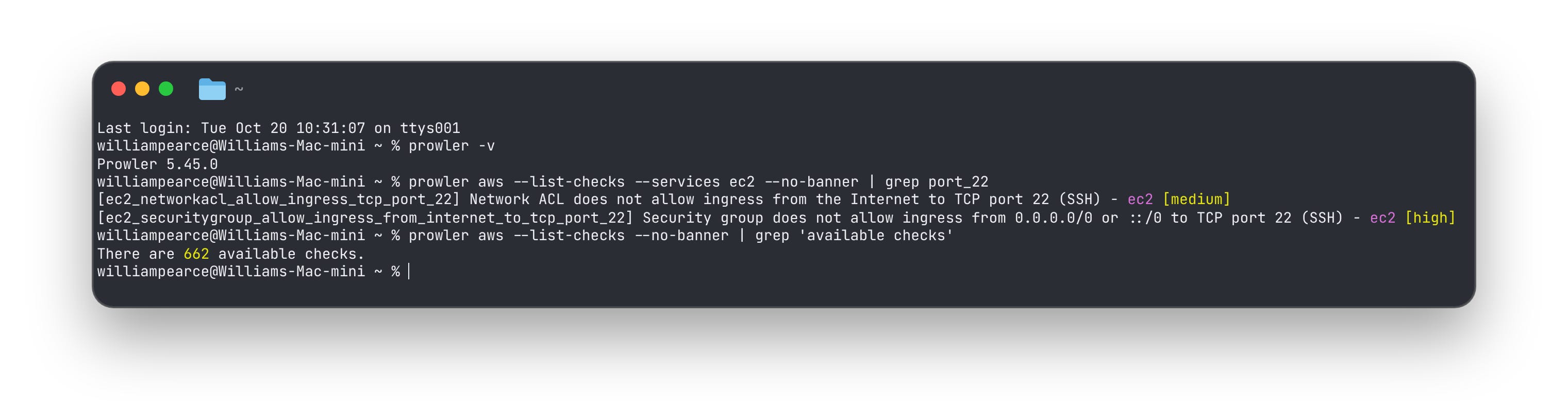
662 checks across 89 AWS services. In 2018 Prowler covered 57 of the 97 checks on Scott’s page. It’s come a long way.
Step Five: Run your first scan
Point it at the region you use (London is eu-west-2):
prowler aws --profile prowler --filter-region eu-west-2 -M csv htmlGrab a brew, it takes a few minutes. When it’s done you’ll get a summary table in the terminal and the full reports in a folder called output wherever you ran the command.
[Image: terminal showing the end of a Prowler scan with the findings summary table]
Open the HTML file in your browser. That’s your report. Every FAIL tells you what’s wrong, why it matters and how to fix it.
[Image: the Prowler HTML report open in a browser]
Don’t panic if there are a lot of FAILs. A brand new account has quite a few, because AWS defaults aren’t always the most secure option.
Step Six: Break something on purpose
Now the fun part. Using your normal admin profile (not the read only one), create a security group that lets anyone on the internet try to SSH in. One of the most common mistakes in AWS.
aws ec2 create-security-group --group-name cybernotes-open-ssh --description "Deliberately bad, delete me" --region eu-west-2That prints a GroupId starting with sg-. Copy it, then open port 22 to the world:
aws ec2 authorize-security-group-ingress --group-id sg-xxxxxxxx --protocol tcp --port 22 --cidr 0.0.0.0/0 --region eu-west-2It’s not attached to anything, so nothing is actually exposed. But it’s exactly the kind of setting that bites people.
Step Seven: Catch it
Run just that one check:
prowler aws --profile prowler --filter-region eu-west-2 --checks ec2_securitygroup_allow_ingress_from_internet_to_tcp_port_22 --scan-unused-services[Image: terminal showing the FAIL for cybernotes-open-ssh with SSH port 22 open to the Internet]
Okay, but what’s --scan-unused-services for? The answer is in the check’s source code. By default Prowler skips security groups that aren’t attached to anything, to cut down on noise. Ours isn’t attached, so without that flag Prowler would quietly ignore it. Little things like this are why you learn a tool properly instead of just running it.
Step Eight: Fix it and prove it
aws ec2 revoke-security-group-ingress --group-id sg-xxxxxxxx --protocol tcp --port 22 --cidr 0.0.0.0/0 --region eu-west-2Run the Step Seven command again. FAIL becomes PASS. Congrats! 🎉
[Image: terminal showing the same check now passing]
Step Nine: Cut through the noise
A few flags that make Prowler much easier to live with:
prowler aws --profile prowler --filter-region eu-west-2 --status FAIL --severity critical high
prowler aws --list-compliance
prowler aws --profile prowler --filter-region eu-west-2 --compliance cis_7.0_aws
The first shows only the critical and high FAILs. The second lists every framework Prowler maps to. The third scores you against the CIS AWS Benchmark (7.0 was the newest CIS version in the list when I wrote this).
Clean up
aws ec2 delete-security-group --group-id sg-xxxxxxxx --region eu-west-2Then delete the prowler-audit access key in IAM. Leaving keys lying around is exactly what Prowler would flag next time. 😉
You don’t need to know every tool. You need to know how to pick one, and how to learn it properly. Thanks to Scott for the homework, and for flAWS. Go play it.
Hit reply and tell me which tool you picked. I read every one.
Thank you for reading: Keep it secure, keep it light hearted!
W J Pearce - Cyber Notes
Calm, practical & self paced training to help you break into Cloud Security & DevSecOps
👉 Pre-order here: techtwoforty.com