



Last Issue: Setup Guide: Odysseus from pewdiepie!?
Next Issue: Are Cloud & Security Certs still worth it?
One from the Archives
I wanted to revisit an old project this week, it was one of the first Cloud Security tools I used and got my head around how it works.
Secrets… Secrets… Secrets… Every company has them, every hacker wants to know them.
TruffleHog is a lightweight tool used to scan for secrets, such as API keys, passwords, or other sensitive information, in code repositories.
While TruffleHog is traditionally used in CI/CD pipelines as part of DevSecOps practices, this project is aimed at those who are just getting started with security scanning. The focus will be on how to use TruffleHog on a single static repo.

I will cover:
How to set it up (Micro Project)
CV Challenge Pointers (You should do this)
So how can you easily set this up?
You’ll need a few things like Docker and Basic Bash commands knowledge but I’ll walk you through it all…
Step One: Install Docker
Install docker. This can be done with a few simple commands:
## Update your system ##
sudo apt-get update
I recently found a new quick way of installing docker.
## Download script and run ##
curl -fsSL https://get.docker.com -o get-docker.sh
sudo sh get-docker.sh
The above is an official script that will do all the work for you. If you are paranoid about running a random script, feel free to look inside it.
Finally check you have docker & docker compose installed correctly
## Version Checker ##
docker --version
docker compose version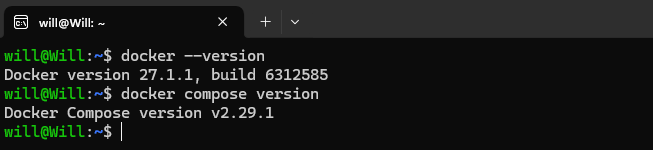
Step Two: Get Trufflehog
Remember, we are using Docker for this project so run the following
docker run --rm -it -v "$PWD:/pwd" trufflesecurity/trufflehog:latest github --repo https://github.com/trufflesecurity/test_keysCommand Breakdown:
docker run: This runs a Docker container.

--rm: Automatically removes the container once it stops, cleaning up after execution.

-it: Runs the container in interactive mode with a terminal (-i for interactive and -t for terminal).

-v "$PWD:/pwd": Mounts the current working directory ($PWD) on your host machine to the /pwd directory inside the Docker container. This allows the container to access files in your local directory.

trufflesecurity/trufflehog:latest: Specifies the Docker image to run, in this case, the latest version of the trufflesecurity/trufflehog image.

github --repo https://github.com/trufflesecurity/test_keys: Runs the TruffleHog tool inside the container to scan the specified GitHub repository (https://github.com/trufflesecurity/test_keys) for sensitive information like secrets.
You should see something like this pop up on the command line, followed by some test results from the example repo.🐷🔑🐷 TruffleHog. Unearth your secrets. 🐷🔑🐷
Step Three: Target our own Git Repo
We now want to run TruffleHog against our own repo, so lets run that command again but this time swap out the example repo with yours. If you don’t have one, follow my guide here: Set up your own Repo!
As you can see I’ve swapped out the example one with my own (Feel free to Fork this):
docker run --rm -it -v "$PWD:/pwd" trufflesecurity/trufflehog:latest github --repo https://github.com/wjpearce-git/Basic-AWS-NetworkingTrufflehog will run against this repo and apart from some metadata about the scan, no secrets will be found.
Step Four: Let’s find some secrets
What if I put a fake user pass and IP in my repo though?!
Let’s try that, I’ll create a new branch with:
git checkout -b thogtestIf you’ve looked at my repo, you’ll see I’m working with Terraform so let’s add the following “Bad” code into the variables.tf file:
##### Trufflehog Test #####
variable "creds" {
  description = "Testing Server"
  default = "http://user:password@192.168.0.1:8080"
}
Let’s push and merge that:
git add .
git commit -am "wip: testing secret detection"
git push --set-upstream origin thogtest
Now run the Docker and Trufflehog again
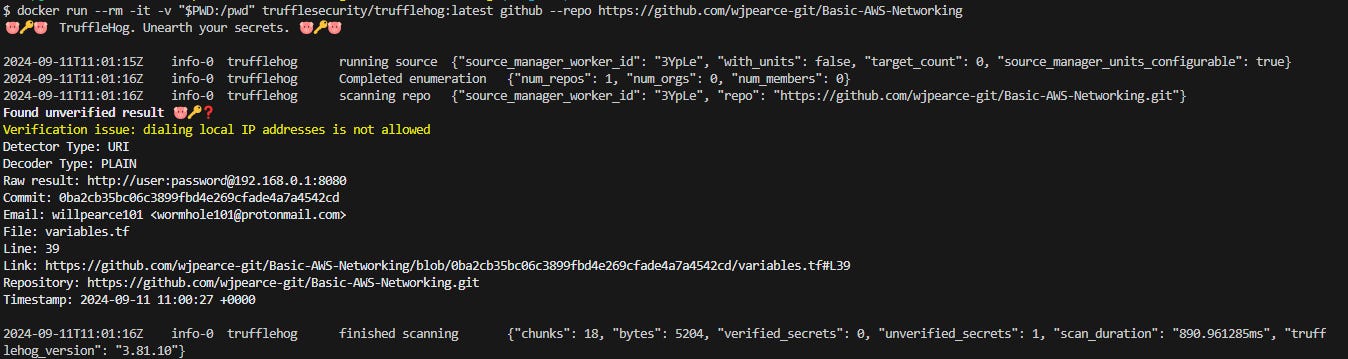
As you would expect, Trufflehog has picked up on this and provided the issue with the line and file.🎉 Congrats you’ve found your first secret! 🎉
Trufflehog’s capabilities go well beyond what we’ve done here.
CV Challenge
If you’re up for a challenge I recommend trying AND DOCUMENTING the following:
Scan an S3 bucket for verified keys - Remember you’ll need to set up an AWS Account.
Scan individual files or directories
Finally, set up Trufflehog to run when a PR is created using GitHub actions so that only the Source Code in the PR is scanned
Here’s a hint to get you started:
name: TruffleHog PR Scan
on: pull_request
jobs:
  scan:
    runs-on: ubuntu-latest
    steps:
      - name: Checkout code
        uses: actions/checkout@v2
      - name: Run TruffleHog
        run: docker run --rm -v ${{ github.workspace }}:/pwd trufflesecurity/trufflehog:latest filesystem /pwd
WJPearce - Cyber Notes
Enjoyed this? Why not check out my other reads…