



Last Issue: DevSecOps Project Video Walkthrough 🚧
Next Issue: AWS EC2 vs Lightsail - Which one to start with?
This Issue: Get Started With Docker MCP Project 📦
By the End of This Post, You:
✅ Understand what MCP is and why it exists
✅ Have Docker MCP Toolkit running locally
✅ Connected Claude to an Obsidian MCP server
✅ Ran your first natural language tool calls
✅ Know where to go next
This is important to understand….
Talking to an LLM is easy. Getting an LLM to do something useful in the wild?
That’s where it’s a little more complicated and you need an “AI Agent.”
In cloud security, when you want one service or tool to communicate with another, you usually use an API. For example, a Lambda function might query NIST data and store the results in an S3 bucket.
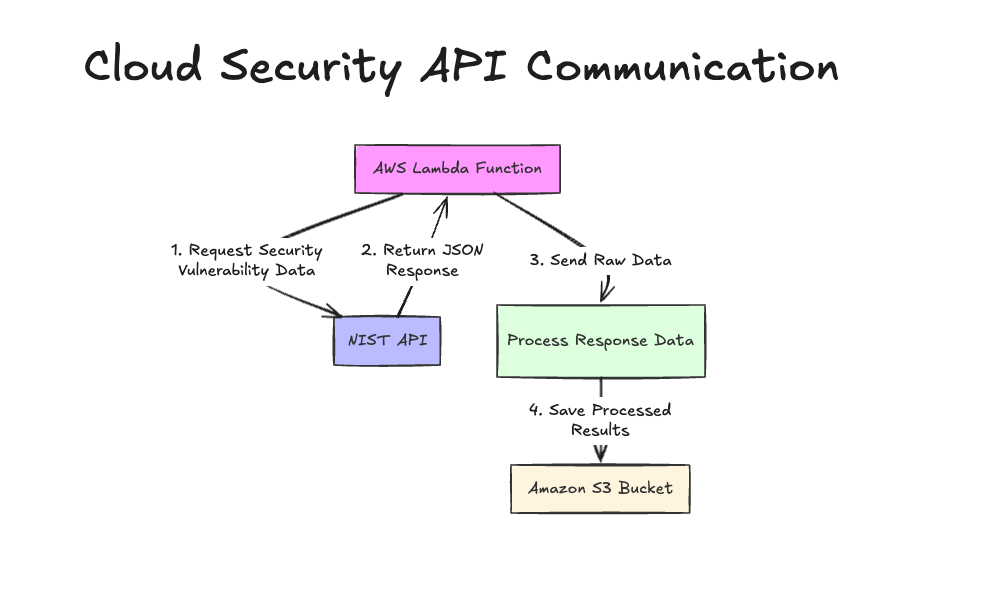
However, as systems scale and every tool “speaks” a different API, integrating them with an AI becomes tangled. You end up writing custom code for each service, handling different authentication flows, and digging through inconsistent documentation every time. That approach doesn’t scale and is extremely difficult to maintain in an LLM driven setup.
That’s exactly the problem MCP is designed to solve.
Very Quickly, What is MCP?
MCP or Model Context Protocol is a standardised way to connect tools to LLMs.
Instead of writing code to call a tool’s API directly, you spin up an MCP server that sits in the middle. The server handles all the API calls, authentication and endpoint logic, so your LLM doesn’t need to know any of it.
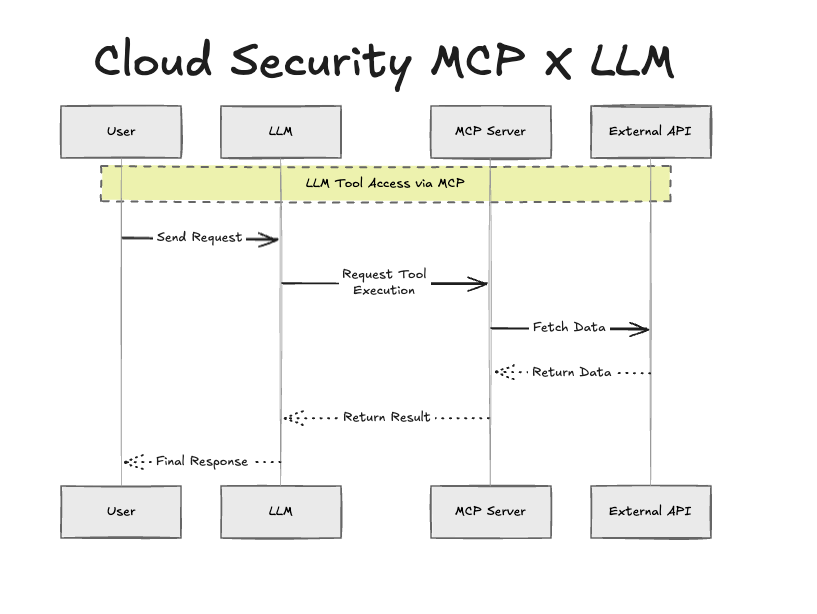
All the LLM needs to do is ask the MCP server to perform a task. The server has the tools, the credentials and the knowledge of how to talk to the endpoint. The LLM stays clean.
This is why it matters: most major company is now exposing their tools via MCP, alongside their traditional API endpoints. It’s becoming the standard layer between AI and software.
The best way to learn is through projects
Here’s what you’ll need to set up your first MCP server locally with Docker
Docker Desktop (latest version)
An LLM app Claude Desktop, LM Studio or Cursor all work
Claude Code (optional but recommended)
