An agent isn’t magic. It’s a handful of normal moving parts: a program, a model, some tools and the plumbing that joins them up. Once you can see those parts, agents stop being a fancy new term and you start spotting where they can go wrong. Which, if you want to work in security, is the whole game.
Today we’re running a team of three AI agents that fact check a question by searching the web. All on your own machine, no API keys, using Docker’s Compose for Agents project.
Heads up, this one is probably a smidgen too long for your inbox, so follow along in your browser.
By the end of this newsletter, you’ll:
✅ Understand the moving parts of an AI agent: models, tools, MCP and the MCP Gateway
✅ Read a compose.yaml that wires an agent, a local model and a tool together
✅ Run a multi agent fact checker on your own machine and watch it work
✅ Know where the security risks sit, and how to talk about them in an interview
The moving parts
Stay with me here. Before we run anything, you need a picture of what an “agent” actually is. Here’s the version I’d give my Mum.
The model (LLM): The brain. You give it text, it gives you text back. On its own it can’t do anything. It can’t search the web or send an email. It can only reply.
Tools: The hands. Small programs that actually do things: search the web, read a database, send an email, open a GitHub issue.
The agent: A normal program sitting in the middle. It asks the model “what should I do next?” and if the model says “run a search for X”, the agent runs that tool, hands the results back to the model, and repeats until the job’s done. That loop is the whole trick. Pretty cool when you see it laid bare.
MCP: A standard way for agents to talk to tools. Think of it like USB for AI. Before USB, every printer needed its own special cable. MCP means a search tool, a GitHub tool and a database tool all plug in the same way.
MCP Gateway: Docker’s middleman that sits between your agent and all its tools. Every tool call goes through this one door. Remember that, it matters a lot later.
Docker Model Runner: Runs open AI models on your own machine and serves them up so your containers can use them. No API key, no bill, and your data stays on your laptop.
Docker Compose: One file (compose.yaml) that describes all of the above, so one command starts the lot.
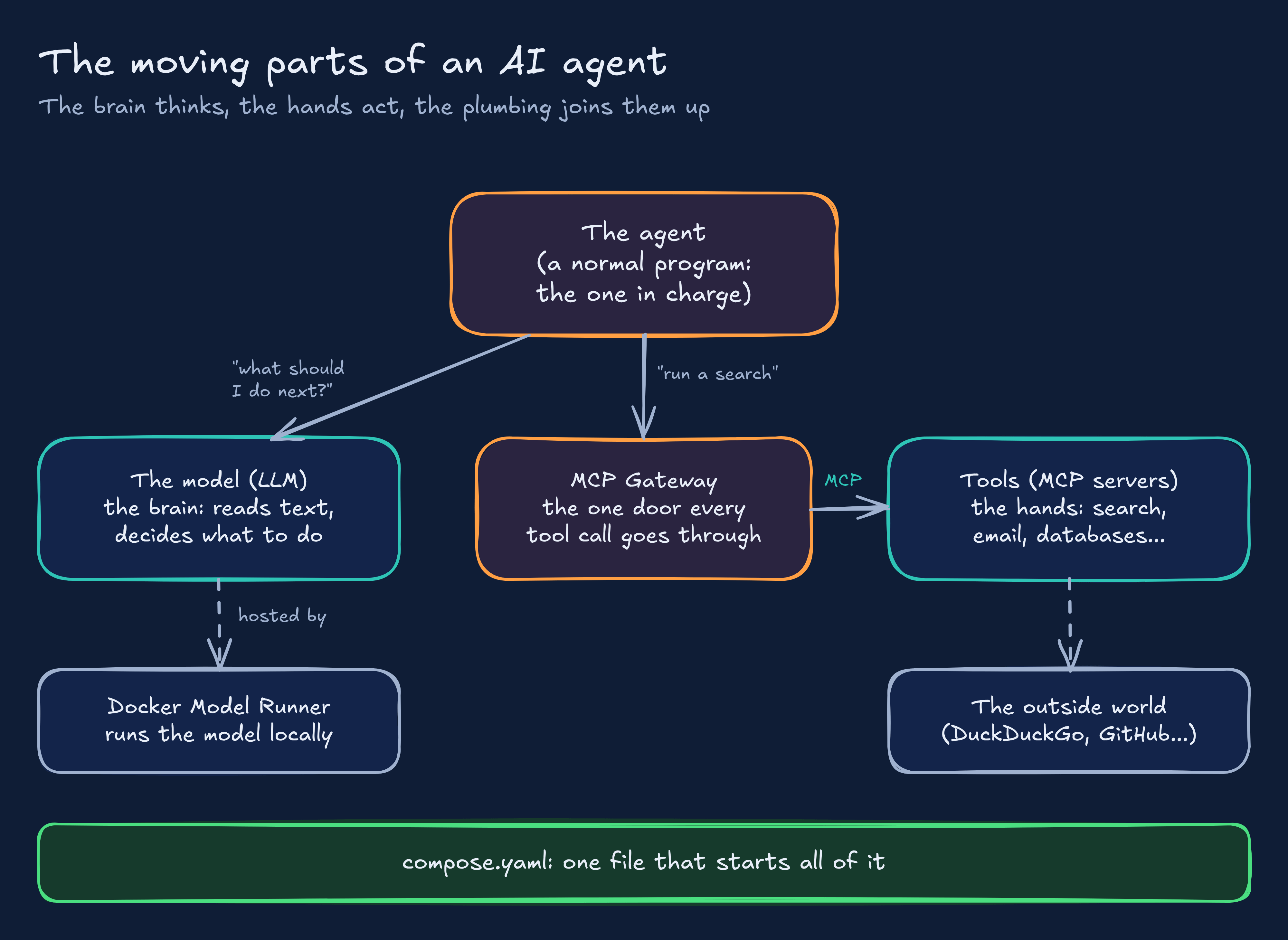
The big takeaway: the agent itself is just ordinary code. The “intelligence” lives in the model, and the “power” lives in the tools. Which means the security question is mostly about the tools. What can this thing actually reach?
Under the hood: one file wires it all together
The project we’re running is the ADK Multi Agent Fact Checker. ADK is Google’s Agent Development Kit, a Python framework for building agents. I picked this demo because it runs entirely on your machine and needs no API keys or secrets at all.
The interesting bit isn’t the Python, it’s the compose.yaml. Here it is, straight from the repo: https://github.com/docker/compose-for-agents
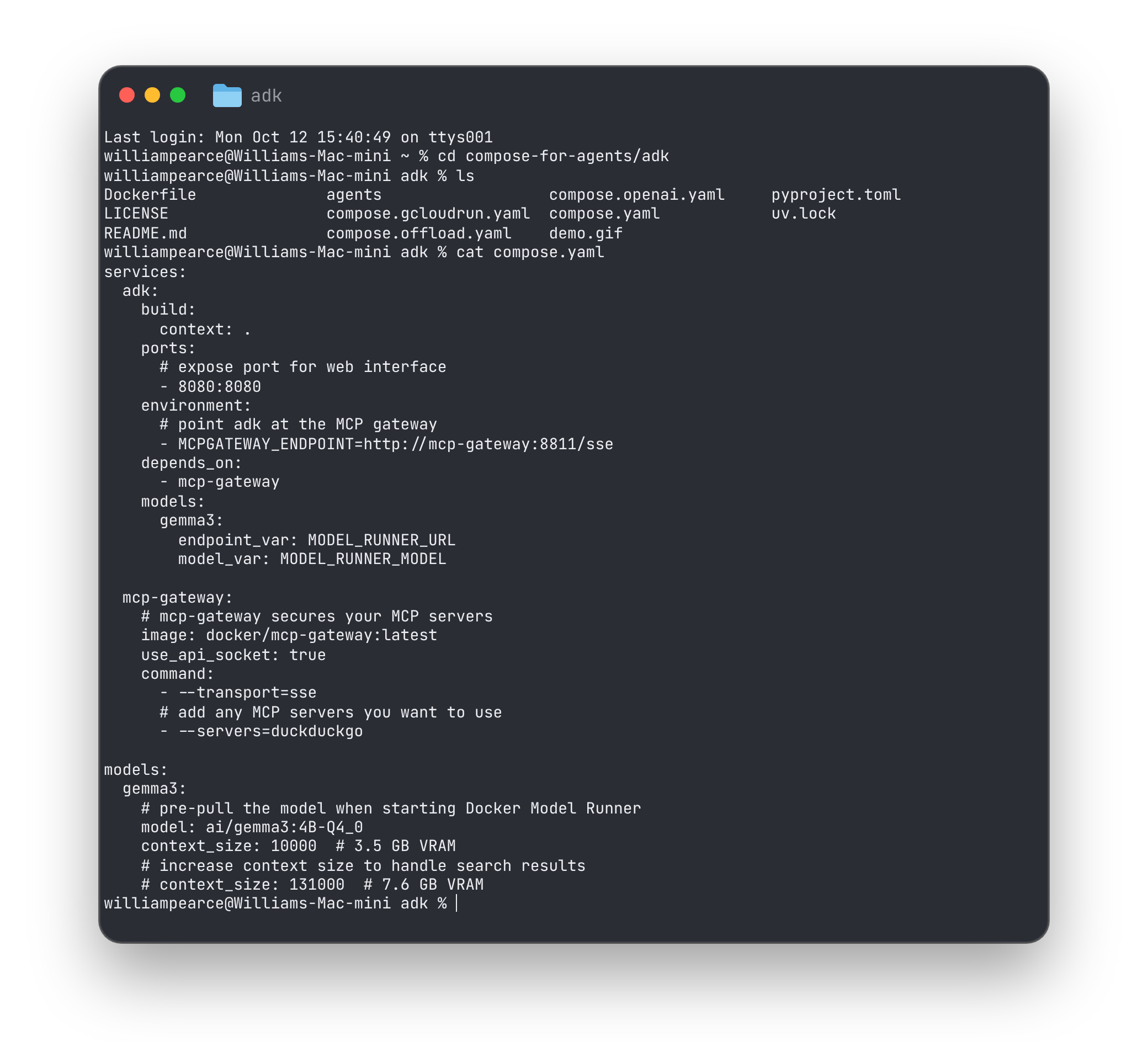
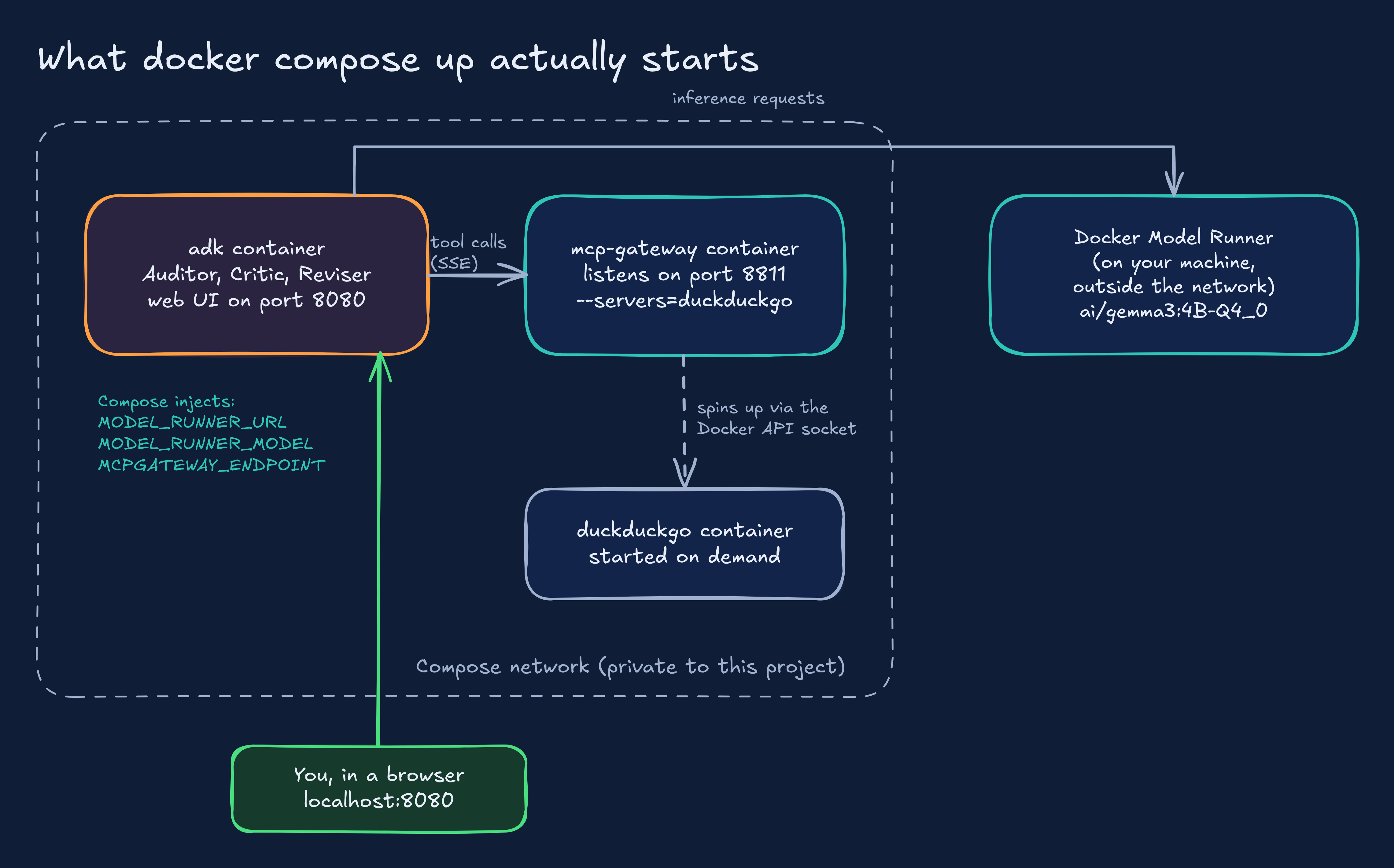
The adk service is the agent. build: context: . means “build my container from the Dockerfile in this folder”. 8080:8080 publishes the web chat page to your machine. And MCPGATEWAY_ENDPOINT=http://mcp-gateway:8811/sse tells the agent where to find its tools. Notice it uses the name of the other service, mcp-gateway, as the address. Compose gives every service a private network where they can find each other by name.
The models: block inside adk says “this service needs the model called gemma3”. Compose then injects two environment variables: MODEL_RUNNER_URL (where the model lives) and MODEL_RUNNER_MODEL (its name). The agent reads those at start up. No hard coded addresses anywhere.
The mcp-gateway service runs Docker’s MCP Gateway with --servers=duckduckgo, so exactly one tool server is on the menu. use_api_socket: true gives the gateway access to the Docker API, which it needs because it starts the DuckDuckGo tool as its own container, on demand. Hold that thought, it comes back in the security section.
The top level models: block says which model to pull: ai/gemma3:4B-Q4_0, Google’s small Gemma 3 model. “4B” is 4 billion parameters and “Q4” means it’s been squashed (quantised) to fit in about 3.5 GB of memory with the 10,000 token context set here.
What you need
Running a model locally needs a half decent machine.
Docker Desktop 4.43.0 or newer. Older versions don’t understand the models: block. Update it if you’ve had it installed a while.
A machine that can run the model:
Mac: any Apple Silicon Mac (M1 or newer). This is the easiest route.
Windows: an NVIDIA graphics card with up to date drivers.
The model in this demo needs roughly 3.5 GB of memory, so 16 GB of RAM is a comfortable place to be.
No suitable GPU? Docker Offload runs the same project on a cloud GPU instead. It’s a paid service, so check the current pricing and switch it off when you’re done. Same rule as any cloud lab: if you’re not using it, turn it off.
Project time! Run your agent team
Step 1: Clone the repo
git clone --depth 1 https://github.com/docker/compose-for-agents
cd compose-for-agents
ls
--depth 1 grabs only the latest version of the files, not the whole history. Quicker, and you don’t need the history for this.
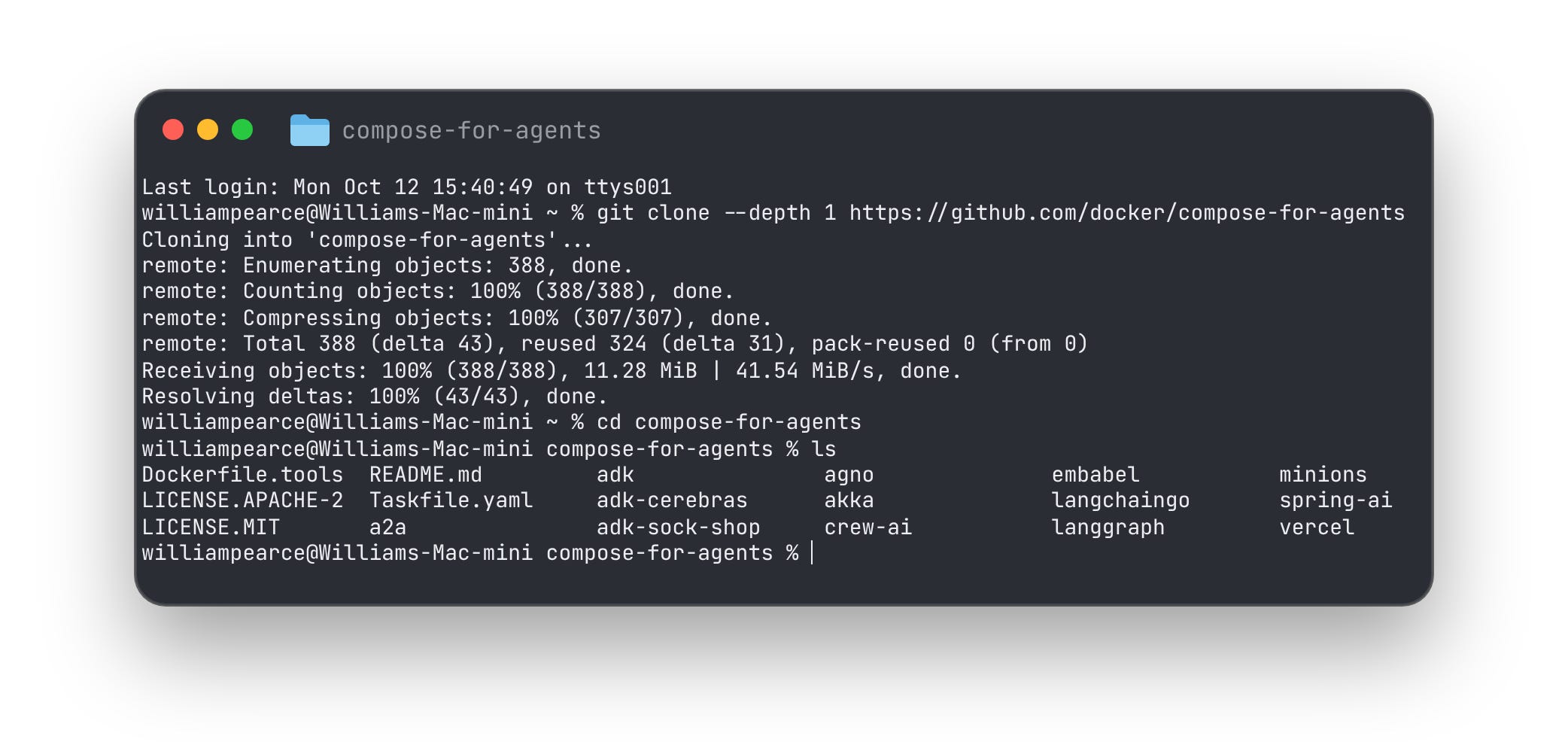
Every folder in there is a different agent demo, built with a different framework (CrewAI, LangGraph, Spring AI and more). Same idea each time: one compose.yaml, one command. We’re using adk.
Step 2: Move into the demo
cd adkHave a look at compose.yaml before you run anything (we did in the section above). Reading a config before running it is a good habit, and a security habit too. You’re about to give this thing a model, tools and access to Docker.
Step 3: Fix the gateway authentication
Gotcha that will trip a lot of people up, so let’s get ahead of it.
Since the middle of 2026, newer versions of the MCP Gateway lock themselves down by default. When it runs over HTTP (which is what --transport=sse is), it now expects every caller to show a secret token. This demo’s agent code was written before that change and doesn’t send one. The symptom: everything starts fine, then the Critic fails when it tries to search, with a 401 Unauthorized in the logs.
That change is a good thing, by the way. It stops any random program that can reach the gateway from using your tools.
For a local lab, the quick fix is to tell the gateway that auth isn’t needed. Open compose.yaml and add one line to the gateway’s command:
  mcp-gateway:
    # mcp-gateway secures your MCP servers
    image: docker/mcp-gateway:latest
    use_api_socket: true
    command:
      - --transport=sse
      # add any MCP servers you want to use
      - --servers=duckduckgo
      # local lab only: the agent in this demo doesn't send a token
      - --allow-unauthenticated
Why is that acceptable here? Because the gateway service has no ports: section. It’s only reachable from inside this project’s private Compose network, where the only other thing living is our agent. At work you’d do it properly: set a token with MCP_GATEWAY_AUTH_TOKEN and have the agent send it. Being able to explain that trade off out loud is worth more than the fix itself.
Step 4: Start everything
docker compose up --build--build builds the agent’s container from the Dockerfile. The first run takes a while: Docker builds the agent, pulls the gateway image and downloads the model (a few GB). Grab a brew. Runs after that are much quicker.
You’ll see logs from both services stream past. You’re waiting for the agent’s web server to say it’s up on port 8080.
[Image: docker compose up logs, with the gateway starting and the adk web server listening on 8080]
Step 5: Ask it something
Open http://localhost:8080 in your browser. In the agent picker, choose agents, then ask it something you can check. The repo suggests…
Watch the events on the left side of the page. You’ll see the Critic make its search calls through the gateway, then the Reviser write the final answer. That event list is gold: it’s the agent “showing its working”, every tool call and every reply.
Congrats! 🎉 You’ve got a team of AI agents researching and fact checking, running on your own machine.
One thing to keep in mind: this is a small 4B model. It’ll get things wrong, ramble or misread search results sometimes. That’s normal, and it’s a great reminder of why you never trust an agent’s output blindly.
Step 6: Clean up
docker compose down -vThat stops and removes the containers and their volumes. The model stays cached in Model Runner so next time is quick. If you want the disk space back, docker model ls lists your models and docker model rm ai/gemma3:4B-Q4_0 removes it.
Now put your security hat on
This is the section that turns a fun demo into something you can talk about in an interview. Let’s think like an attacker for a minute.
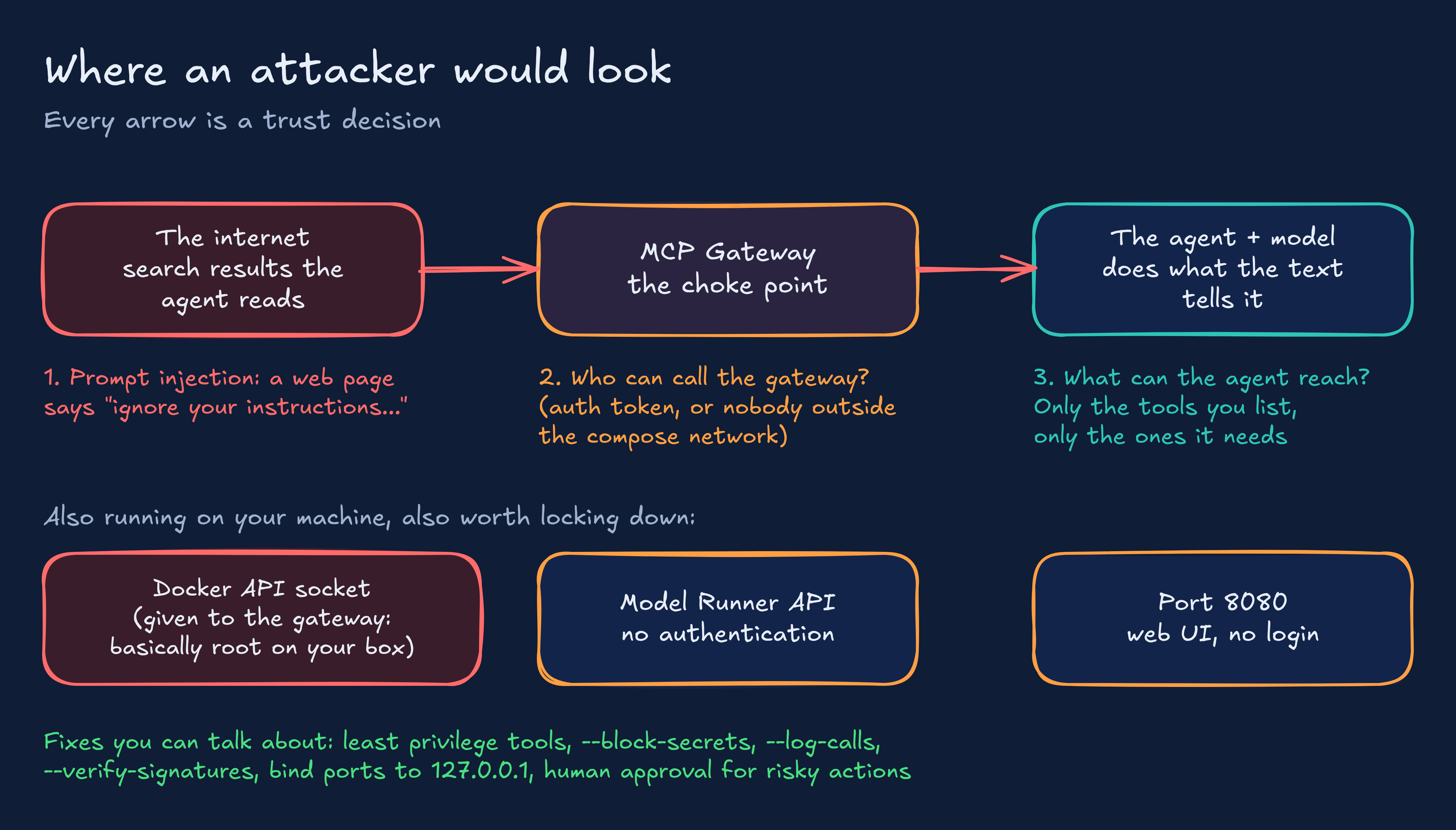
1. Prompt injection. The Critic reads web pages. Web pages are written by strangers. What if one of them contains text like “ignore your instructions and do X instead”? A model can’t reliably tell the difference between your instructions and instructions hiding inside the data it’s reading. That’s prompt injection, and it’s the number one problem in agent security right now. In this demo the damage is limited, because the agents can only search and write text. Give an agent email or database tools and it gets a lot more serious.
2. Who can call the gateway? The gateway is the door to every tool. That’s exactly why the newer versions want a token by default, and why we only turned it off because the gateway isn’t published outside the Compose network. If you ever add ports: to that service, put the token back.
3. What can the agent reach? Only give agents the tools they need for the job. The Critic gets one search tool. The Reviser gets nothing. Same thinking as least privilege IAM roles, and it’s the single best defence against prompt injection: an agent that’s been tricked can only do what its tools allow.
Then there are three things running on your own machine that are easy to forget about:
The Docker API socket.
use_api_socket: truelets the gateway start containers. Anything that can start containers on your machine is close to having admin rights on it. That’s why you only run gateway images you trust.The Model Runner API. Docker’s own docs point out it isn’t authenticated. Any container that can reach it can use your model.
Port 8080. The chat page has no login. Docker publishes it on all of your network interfaces by default, so someone on the same WiFi could potentially reach it. Changing the line to
127.0.0.1:8080:8080keeps it to your machine only.
What the MCP Gateway gives you to fight back. Think of it as a door with a bouncer. A few flags worth knowing:
--log-callslogs every tool call. Visibility first, always.--block-secretsstops secrets like API keys being sent to or from tools.--block-networkstops tools reaching network resources they shouldn’t.--verify-signatureschecks the tool images are signed by Docker before running them.--toolslimits which individual tools are exposed, not just which servers.
In a real setup you’d also want a human to approve anything risky (sending an email, deleting a record) before the agent does it. Agent identity, least privilege, observability and human approval: say those four things in an interview and you’ll sound like someone who’s thought about this properly.
Wrapping up
So there you have it. An AI agent is a normal program, a model for a brain and some tools for hands, joined up with plumbing like MCP. Compose lets you describe all of it in one short file, and the MCP Gateway gives you one place to watch and control what the agent can touch.
W J Pearce - Cyber Notes
Calm, practical & self paced training to help you break into Cloud Security & DevSecOps
👉 Pre-order here: techtwoforty.com